Record, transcribe, and ask questions across your meetings with AI that runs on your Mac. Keep summaries, decisions, and tasks as portable Markdown files.
Free forever. No account needed. Your notes are yours.
Teams, Zoom, Google Meet, Slack, or in person. No meeting bot required.
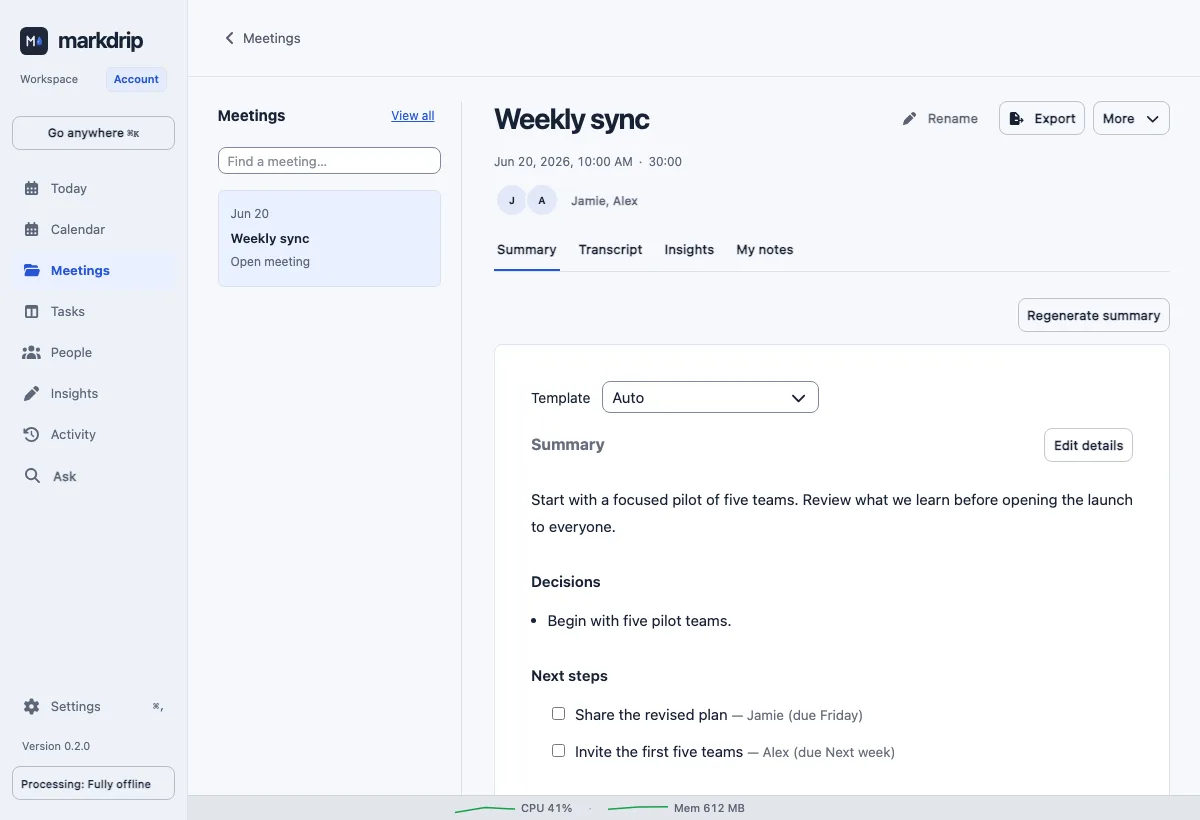
Actual app interface · fictional sample meeting
No monthly minute quota.On-device AI.Portable Markdown.
YOUR NOTES. YOUR TOOLS.
Good ideas don’t stay in one app.
Keep your meeting notes alongside the rest of your thinking. Open your Markdown files in Obsidian or another editor. Connect compatible AI tools and agents through MCP when you choose. Read access is Free. Plus adds explicitly enabled immediate changes to contacts, meeting titles and tags, and tasks.
Capture your microphone and meeting audio without a meeting-app integration. Connect a calendar if you’d like to prepare an agenda before the conversation.
02
Leave with a clear next step.
Review a summary, decisions, and action items once your recording has been processed.
03
Come back to what matters.
Ask questions across your meeting history. Check the transcript and replay the original audio when you want to revisit the details.
INCLUDED IN THE UPCOMING 1.0 RELEASE
Prepare with context. Reflect with evidence.
These Plus features are included in the upcoming 1.0 release, pending final native acceptance. Your contact's decisions and open actions, brought together from the meetings you choose. Add your own context, choose a professional focus, and explore a small practice for your next conversation.
Pick up where you left off.
Contacts shows dated interactions and links back to the source. Your private notes stay clearly separate from what was recorded.
Make reflection useful.
My coach offers suggestions linked to available evidence. Review documentation trends over time, adjust your focus, and exclude meetings whenever you need to.
AI suggestions can miss context. Review the sources and use your judgment. No personality, emotion, or employee performance scores.
SEE THE RESULT. THEN TRY YOUR OWN.
One meeting is a good place to start.
See a decision become a next step in the actual app. Then evaluate Markdrip alongside your current workflow, without moving your archive.
 Markdrip